Use this form for:
- Standard B2B stock transfers (no change of beneficial owner)
- Off Market Transfers/OMTs (change of beneficial owner)
-
Transferring stock in from a custodian
To transfer stock from Broker to Broker, in TC Ops navigate to Transfers > Transfer Requests in the lefthand menu and then click the "+ Create Transfer" dropdown in the top righthand of the screen. Select "Broker to Broker Transfer".
Complete the form as follows:
-
Receiving Account - Complete details of receiving account at FinClear. Search by account number/name and the other details will be pre-filled for you.
-
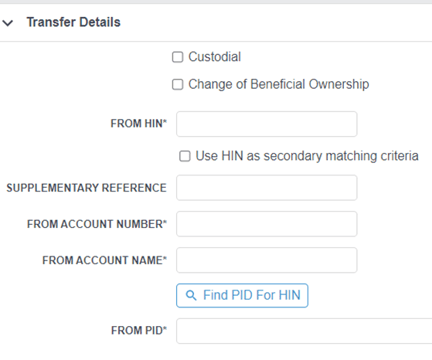
Transfer details - Complete details of delivering account (HIN, account number at other broker, account name at other broker) as well as the PID of the delivering broker (you can search the broker byname of click "Find PID for HIN")
If delivering account is with a custodian - tick Custodial
If delivering account is in a different name (Off Market Transfer) – tick Change of Beneficial Ownership.
-
From Registered address – Complete the CHESS Registration address as it is at the other broker.
-
Securities – list securities to be transferred. For high volumes there is a CSV Import option. If you have cost base information available, you should include the total cost here under "consideration" (if consideration is left blank, cost base will come across as zero and can be updated at a later date).
-
Documents – Confirm signatories & download form. Transfer can now be saved as a draft pending receipt of paperwork. Once received, upload Signed Transfer Form + Licence or Passport. *
*Most brokers require wet signatures + ID with each transfer request. There may be some exceptions to this, for the latest information please contact our transfers team.